

.png&w=3840&q=70)




10 Essential Restaurant Apps Every Owner Needs
Discover how restaurant apps help owners manage labor, payroll, inventory, food safety, reporting, and back-office operations more efficiently every day.

The Value of Restaurant Apps
Restaurant apps help owners turn daily operational activity into measurable data. While the POS records sales and payments, back-office apps can track labor hours, payroll, inventory, purchasing, food safety, accounting, and task completion. A restaurant generating $50,000 in weekly sales may also need to monitor hundreds of employee hours, dozens of supplier invoices, thousands of inventory units, and multiple daily safety checks. Managing this information through spreadsheets or paper records can make it difficult to identify problems quickly. For example, scheduling and time clock apps can compare scheduled labor hours with actual hours worked. If employees are scheduled for 500 hours but work 540, management can investigate the additional 40 hours and determine whether overtime, early clock-ins, or scheduling gaps caused the variance. Inventory apps provide similar visibility. If records show that 200 units of an ingredient should have been used based on sales but actual usage reaches 225 units, managers have a 25-unit variance to investigate. Reporting apps can bring these figures together, helping owners compare metrics such as sales, labor cost percentage, food cost percentage, inventory variance, and task completion rates.
Scheduling and Time Clock Apps
Labor is one of the most difficult restaurant expenses to manage because staffing needs can change throughout the day. Scheduling and time clock apps can help restaurant owners control labor more accurately while giving managers a clearer view of employee availability, attendance, and worked hours. App 1. Employee Scheduling App An employee scheduling app helps managers build schedules based on expected sales, employee availability, operating hours, and staffing requirements. Instead of creating schedules manually, managers can assign shifts, publish schedules, process time-off requests, and handle shift changes from one system. For restaurant owners, the biggest advantage is improved labor visibility. Scheduling apps can show projected labor hours and estimated labor costs before the schedule is finalized. Managers can then compare staffing levels with forecasted demand and make adjustments before employees arrive for their shifts. Scheduling apps can also reduce communication problems. Employees may be able to view schedules, receive updates, request time off, or offer shifts through a mobile app rather than relying on printed schedules or group messages. App 2. Time Clock App A time clock app records when employees actually start and finish work. This allows restaurant owners to compare scheduled hours with worked hours and identify differences caused by early clock-ins, late clock-outs, missed breaks, overtime, or unscheduled shifts. Modern time clock apps may also support employee PINs, biometric verification, mobile clock-ins, geolocation controls, and manager alerts. Connecting scheduling and timekeeping is particularly useful because it creates a direct view of planned versus actual labor. For example, if a restaurant schedules 400 labor hours for a week but employees work 430 hours, managers can investigate the additional 30 hours instead of discovering the difference only after payroll is processed. Together, scheduling and time clock apps help restaurant owners manage staffing proactively, maintain accurate labor records, and make data-based labor decisions rather than relying on estimates.
Payroll and HR Management
Payroll and human resources involve some of the most detail-heavy administrative work in a restaurant. Employee hours, overtime, wages, tax information, onboarding records, training documents, and certifications all need to be organized accurately. Payroll and HR apps can help restaurant owners reduce manual work and keep workforce information in one place. App 3. Payroll App A payroll app helps restaurants calculate employee pay based on hours worked, wage rates, overtime, bonuses, and other compensation. When the payroll system connects directly with a time clock app, managers can transfer approved employee hours without manually entering the same information again. This can reduce payroll errors and make unusual labor activity easier to identify before payroll is processed. For example, managers can review overtime, missing punches, or unexpected hours and correct problems before they affect employee pay. Payroll apps may also support payroll tax calculations, direct deposit, pay statements, and payroll reporting. Restaurant owners should look for systems that can handle the wage and overtime requirements that apply to their workforce. App 4. HR Management App An HR management app provides a central location for employee records and workforce administration. Restaurant managers can use it to organize onboarding documents, employee contact information, training records, certifications, policies, performance documentation, and other employment-related information. Digital HR records can be especially valuable for restaurants with high employee counts or multiple locations. Instead of storing information in separate folders, spreadsheets, and email threads, managers can access employee records from one system. Some HR apps also allow owners to track document expiration dates, training completion, and required certifications. Automated reminders can alert managers when action is needed. Together, payroll and HR apps can create a more organized employee management process. The goal is not simply to digitize paperwork, but to connect employee information, worked hours, payroll, and workforce records so managers spend less time on administration and have better visibility into labor operations.

Inventory and Purchasing Apps
Food costs can change quickly because of fluctuating ingredient prices, waste, portioning errors, and inconsistent purchasing. Inventory and purchasing apps help restaurant owners track what they have on hand, what they are using, and how much they are paying for ingredients. App 5. Inventory Management App An inventory management app gives restaurant owners a more accurate way to monitor ingredient quantities and usage. Instead of relying only on manual counts or spreadsheets, managers can record inventory digitally and compare current stock levels with expected usage. These apps can help track food cost percentage, inventory turnover, waste, and variance between theoretical and actual usage. That makes it easier to spot problems such as overportioning, spoilage, unrecorded waste, or possible theft. For example, if a restaurant should have used 100 pounds of chicken based on sales but inventory records show that 115 pounds were used, the 15-pound difference creates a clear variance for managers to investigate. Inventory apps can also support recipe costing by connecting ingredient prices with menu items. When supplier prices rise, owners can see how those changes affect plate costs and profit margins. App 6. Purchasing App A purchasing app helps restaurants organize the process of ordering ingredients and supplies. Managers can create purchase orders, compare vendor prices, review order histories, and track deliveries from one system. This is especially useful when restaurants work with multiple suppliers. A purchasing app can help owners identify price changes and determine whether certain products are consistently being purchased at higher costs. Some systems also connect purchasing data with inventory and accounts payable. When an invoice arrives, managers can compare it with the original purchase order and delivery information before approving payment. Together, inventory and purchasing apps give restaurant owners better control over the flow of food and money. They make it easier to identify cost increases, reduce unnecessary purchases, monitor waste, and make purchasing decisions using current operational data.
Accounting and Reporting Apps
Restaurant owners need accurate financial data to understand whether the business is profitable and where costs are increasing. Accounting and reporting apps can help organize financial information, reduce manual data entry, and monitor performance across sales, labor, food costs, and other expenses. App 7. Restaurant Accounting App A restaurant accounting app helps owners track income, expenses, invoices, payments, and other financial transactions. When connected with the POS, payroll, inventory, and purchasing systems, accounting software can automatically bring important financial data into one place. This can reduce the need to enter the same information manually into multiple systems. For example, daily sales data can flow from the POS into the accounting system, while payroll expenses and vendor invoices can be categorized for financial reporting. Restaurant owners can use accounting apps to review profit and loss statements, cash flow, accounts payable, and other financial records. Comparing these figures over time can help identify rising expenses or changes in restaurant profitability. App 8. Restaurant Reporting App A reporting app turns operational data into dashboards, reports, and performance metrics. Instead of reviewing separate systems individually, owners can bring together information such as sales, labor costs, food costs, transactions, and location performance. For example, a restaurant owner might compare weekly sales of $50,000 with $15,000 in labor expenses. That would represent a 30% labor cost percentage, giving management a clear metric to monitor alongside other operating costs. Reporting apps are particularly useful for multi-location restaurants because owners can compare performance across stores from one dashboard. They can identify which locations are meeting targets and which may require closer attention. The most useful reporting apps should provide information owners can act on quickly. Rather than collecting as much data as possible, restaurants should focus on metrics that influence profitability, labor efficiency, food costs, and operational performance. Connecting accounting and reporting apps with other back-office systems gives restaurant owners a more complete financial view of the business.
Food Safety and Checklist Apps
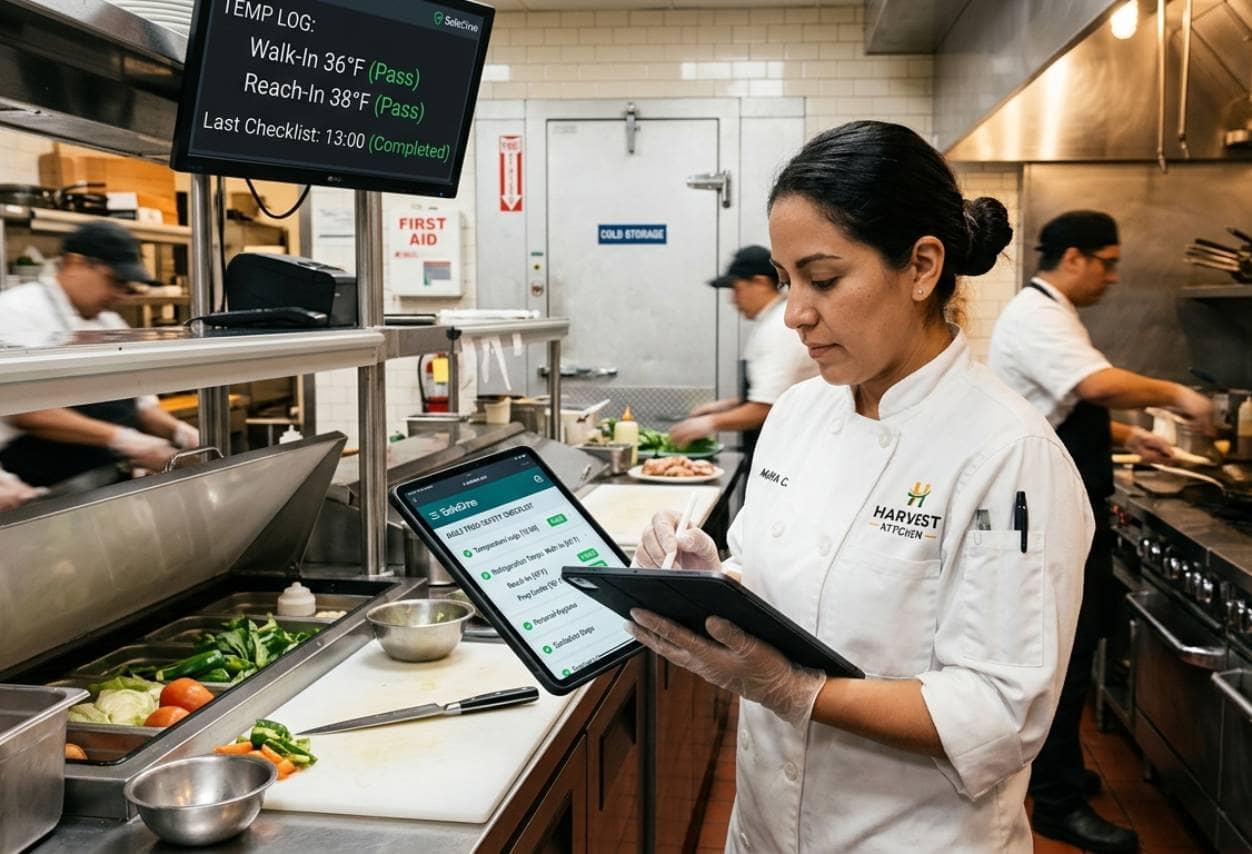
Restaurants depend on consistent daily routines to maintain food safety, cleanliness, and operational standards. Food safety and checklist apps can help owners replace paper-based processes with digital records that are easier to monitor, verify, and review. App 9. Food Safety App A food safety app helps restaurant teams document critical safety procedures throughout the day. Employees can record refrigerator temperatures, cooking temperatures, cooling times, holding temperatures, and other food safety checks directly from a mobile device or tablet. Digital records can make it easier for managers to identify missed checks or unusual readings. For example, if a walk-in refrigerator should remain at 40 Fahrenheit or below but an employee records 45 Fahrenheit, the system can flag the issue so managers can investigate before food safety is affected. Some food safety apps also support HACCP procedures, corrective actions, thermometer integrations, and automated alerts. This can give owners greater visibility into whether required safety checks are being completed consistently across shifts and locations. App 10. Restaurant Checklist App A restaurant checklist app helps standardize recurring tasks such as opening procedures, closing duties, cleaning schedules, equipment inspections, and manager walkthroughs. Managers can assign tasks by role, shift, or location and monitor completion in real time. Instead of relying on paper sheets that may be lost or completed inconsistently, digital checklists create a record of who completed each task and when it was finished. Checklist apps can also help multi-location operators maintain consistent standards across every restaurant. Owners can use the same procedures across locations while giving individual managers responsibility for execution. Together, food safety and checklist apps help create greater accountability in daily operations. They give restaurant owners clearer records, faster visibility into missed tasks, and a more structured way to maintain consistent operating standards.
Build the Right Restaurant App Stack
Restaurant owners do not need every available app. The goal is to choose a group of tools that solves the restaurant's most important operational problems without creating unnecessary cost or complexity. Start by identifying the areas that consume the most management time or create the most errors. A restaurant struggling with overtime may prioritize scheduling and time clock apps, while a restaurant dealing with food waste may benefit more from inventory and purchasing tools. The right app stack will also depend on restaurant size and operating model. A single-location restaurant may only need a few core systems, while a multi-location operator may require centralized reporting, standardized checklists, HR management, and location-level performance dashboards. Before selecting an app, evaluate several factors - 1. Integration - Confirm that the app connects with your POS and other existing systems. 2. Usability - Managers and employees should be able to learn the platform without complicated processes. 3. Cost - Compare subscription fees, setup costs, integration charges, and any per-location or per-user pricing. 4. Scalability - Choose apps that can support additional employees or locations as the restaurant grows. 5. Mobile access - Managers may need to review schedules, reports, tasks, or alerts when they are away from the back office. 6. Reporting - Make sure the app provides useful data instead of simply collecting information. Restaurant owners should also look for overlapping functionality. Paying separately for scheduling, timekeeping, communication, reporting, and task management may be unnecessary if one platform already handles several of those functions. Review the restaurant app stack regularly. Track which systems managers actually use, where manual work still exists, and whether integrations are functioning as expected.