California Penalizes Dickey's for Franchise Disclosure Violations
California shifts to public enforcement strategy against Dickey's for deceptive franchise disclosures, signaling stricter state-level franchise oversight.
Sep 10, 2026
California shifts to public enforcement strategy against Dickey's for deceptive franchise disclosures, signaling stricter state-level franchise oversight.
Sep 10, 2026
Paul Brown temporarily steps away from Inspire Brands as Scott Murphy assumes interim CEO role during confidential IPO filing process targeting late 2026.
Sep 10, 2026
Prepare your restaurant for NFL season with smart menu planning, staffing, marketing, technology, and atmosphere strategies that boost season-long revenue.
Sep 9, 2026
Learn how to reduce food waste in restaurants through smarter purchasing, storage, preparation, and service strategies that cut costs.
Sep 9, 2026
Swig signs franchise agreement for 11 South Denver locations, marking Colorado entry and validating its national expansion strategy.
Sep 8, 2026
QR code menus let restaurants replace paper menus digitally, enabling instant updates, contactless browsing, ordering, and payment through simple smartphone scanning.
Sep 7, 2026
Complete guide helping restaurant owners choose essential kitchen equipment - covering cooking, refrigeration, prep, sanitation, ventilation, safety, and long-term maintenance planning.
Sep 7, 2026
Avoiding common restaurant payroll mistakes - misclassification, tip credit errors, overtime miscalculations - protects businesses from costly penalties, back pay, and compliance risks.
Sep 4, 2026
Learn to calculate par levels for restaurant food, beverages, and packaging inventory, preventing stockouts and waste through proper formulas.
Sep 4, 2026
Caribou Coffee appoints Zane Thomas-Rogers as Chief Operations Officer to strengthen execution across its expanding coffeehouse network.
Sep 4, 2026
Unlock Exclusive Access To Webinars, Events, And The Latest News For Free!
See how a kitchen display system supports faster service, better communication, accurate orders, organized workflows, and improved kitchen performance management.

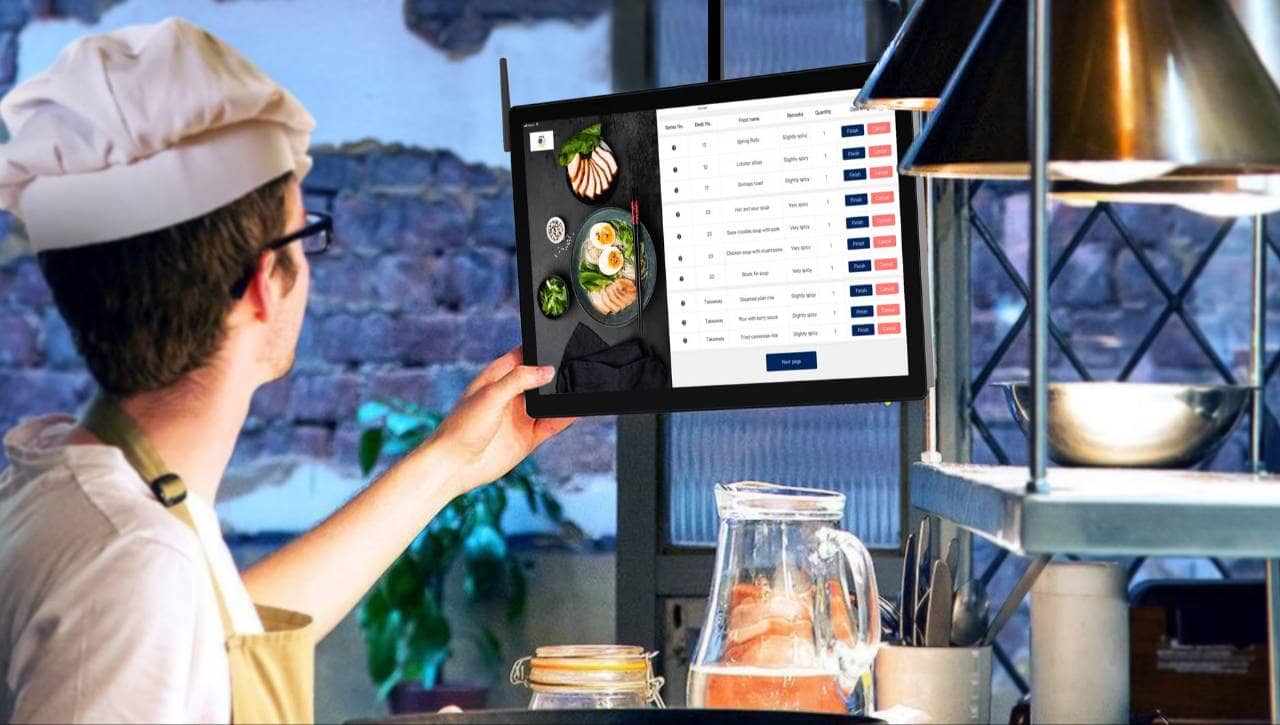
A Kitchen Display System (KDS) is a digital system that displays restaurant orders on screens in the kitchen instead of relying only on printed paper tickets. It helps kitchen employees see what needs to be prepared, track the status of each order, and coordinate work across different preparation stations. When a customer places an order through a restaurant's point-of-sale (POS) system, online ordering platform, self-service kiosk, or another connected ordering channel, the order can be sent directly to the appropriate kitchen display. Employees can then view important information such as menu items, quantities, modifications, table numbers, order types, and special preparation instructions. A typical Kitchen Display System includes several components - 1. Kitchen screens - Displays placed at cooking, preparation, or expediting stations where employees can view incoming orders. 2. KDS software - Organizes orders, routes menu items to the correct stations, tracks preparation times, and updates order statuses. 3. POS integration - Connects the Kitchen Display System with the restaurant's POS so orders can move from the front of house to the kitchen automatically. 4. Order routing - Directs specific menu items to the employees responsible for preparing them. For example, grilled items may appear on the grill station screen while salads appear at the cold preparation station.5 5. Order tracking - Allows employees to mark items or entire orders as started, completed, or ready for pickup. Unlike traditional kitchen printers, a KDS can provide restaurants with a real-time view of the entire order queue. Kitchen teams can see which orders have been waiting the longest, identify priority orders, and monitor preparation progress without sorting through stacks of paper tickets. For restaurant owners, the main purpose of a Kitchen Display System is to create a more organized flow of information between ordering channels and kitchen employees. When properly configured, it can provide greater visibility into kitchen operations while helping employees manage orders more consistently during both normal and high-volume service periods.
A Kitchen Display System works by receiving order information from connected restaurant systems and displaying it on kitchen screens in real time. Instead of printing a paper ticket for every order, the system sends the order digitally to the employees responsible for preparing it. The process typically works in five steps - 1. The customer places an order - An order may come from the restaurant POS, online ordering platform, self-service kiosk, drive-thru, or another connected ordering channel. 2. The order enters the restaurant system - Once the order is confirmed, the POS or ordering platform records the items, quantities, modifiers, order type, and other important details. 3. The KDS routes the order - The Kitchen Display System sends each item to the appropriate preparation station. For example, burgers may appear at the grill station, while fries are sent to the fryer station. 4. Kitchen employees prepare the order - Employees use the screens to see incoming tickets, preparation instructions, modifiers, and order priorities. Timers may show how long each ticket has been waiting. 5. The order is marked complete - When an item or order is finished, employees can update its status. The completed order may then move to an expeditor screen or be marked ready for pickup, delivery, or table service. This digital workflow gives kitchen employees a shared view of active orders. Instead of relying on verbal communication or searching through printed tickets, employees can quickly see what needs attention. Many systems also organize orders based on factors such as arrival time, preparation time, order type, or priority. Visual alerts can highlight tickets that are approaching or exceeding target preparation times. For restaurant owners, understanding this workflow is important because the effectiveness of a KDS depends heavily on how it is configured. Proper routing, clear menu mapping, and logical station assignments help ensure that the right information reaches the right employees at the right time.

Order routing is one of the most important functions of a Kitchen Display System because it determines where each menu item appears after an order is placed. Instead of sending the entire order to every employee, the system can automatically direct specific items to the kitchen stations responsible for preparing them. For example, a restaurant may configure its KDS so that - 1. Grilled items go to the grill station - Burgers, steaks, chicken, or other grilled products appear on the screen used by grill employees. 2. Fried items go to the fryer station - French fries, chicken tenders, onion rings, and similar items are routed directly to the fryer team. 3. Cold items go to the prep station - Salads, sandwiches, desserts, or other cold items may be displayed on a separate preparation screen. 4. Completed items go to the expeditor - Once individual items are finished, the system can help the expeditor see when the entire order is ready to be assembled and served. This routing process becomes especially useful when a single customer order contains items prepared at several stations. Each employee can focus on the items relevant to their area while the system keeps the overall ticket connected. Restaurants can also configure routing rules based on order type. Dine-in, takeout, delivery, drive-thru, and online orders may be displayed differently or prioritized according to operational needs. Effective routing can help reduce unnecessary verbal communication and make responsibilities clearer during busy periods. Employees do not have to repeatedly ask which station is preparing an item or search through paper tickets to determine what comes next. Restaurant owners should review routing rules carefully when setting up a Kitchen Display System. Menu changes, new preparation stations, or changes in kitchen workflow may require updates to ensure orders continue reaching the correct employees. A well-configured routing structure helps create a more organized kitchen and supports smoother coordination across the entire preparation process.
A Kitchen Display System does more than display incoming orders. Most systems include features designed to help kitchen employees organize tickets, manage preparation times, and coordinate work more efficiently. Common Kitchen Display System features include - 1. Order timers - Timers show how long each order has been waiting or in preparation. This helps employees identify older tickets and gives managers better visibility into kitchen speed. 2. Color-coded alerts - Orders may change color as they approach or exceed target preparation times. These visual alerts make it easier for employees to identify tickets that require immediate attention. 3. Item modifiers and special instructions - The KDS can display information such as no onions, extra cheese, allergy alert, or specific cooking preferences. Clear modifiers can help reduce preparation mistakes. 4. Order prioritization - Some systems allow orders to be prioritized based on factors such as order type, promised pickup time, or service channel. This can help kitchens manage dine-in, takeout, delivery, and drive-thru orders at the same time. 5. Order status tracking - Employees can mark items or tickets as started, completed, or ready. This creates greater visibility into where each order is in the preparation process. 6. Order recall - Completed tickets can often be reopened if employees need to review an order or correct an issue. 7. Custom station displays - Restaurants can configure screens so employees only see the menu items relevant to their station. 8. Kitchen performance reporting - Some KDS platforms track metrics such as average preparation time, ticket completion time, and order volume. Restaurant owners should focus on features that solve specific operational problems rather than choosing a system based on the number of features available. A high-volume quick-service restaurant, for example, may place greater importance on timers and order prioritization, while a full-service restaurant may need stronger station routing and order coordination. The most useful Kitchen Display System features are those that make order information easier to understand and help employees manage kitchen workflows consistently.
A Kitchen Display System is most effective when it connects with the other technology a restaurant already uses. These integrations allow order information to move automatically between systems, reducing manual entry and helping employees manage orders from multiple channels in one workflow. Common KDS integrations include - 1. Point-of-sale systems - The POS is often the primary source of order information. When an employee enters an order, the KDS can immediately display the relevant items at the appropriate kitchen stations. 2. Online ordering platforms - Orders placed through a restaurant's website or mobile ordering system can be sent directly to the kitchen. This reduces the need for employees to manually re-enter online orders into the POS. 3. Third-party delivery platforms - Delivery orders can be integrated into the same kitchen workflow as dine-in and takeout orders. This helps prevent employees from managing separate tablets or paper tickets for each delivery channel. 4. Self-service kiosks - Orders placed at kiosks can automatically flow to the Kitchen Display System once they are confirmed, allowing kitchen employees to begin preparation without additional steps. 5. Drive-thru systems - Quick-service restaurants may connect drive-thru ordering technology with their KDS so orders appear immediately and can be prioritized based on service-time goals. 6. Menu management systems - Integrated menu data helps ensure item names, modifiers, preparation instructions, and routing rules remain consistent across ordering channels. 7. Restaurant reporting tools - KDS data can contribute to reports on ticket times, order volume, station performance, and other operational metrics. Restaurant owners should verify compatibility before selecting a Kitchen Display System. Not every KDS works with every POS, online ordering platform, or delivery service. It is also important to understand how information moves between systems. A strong integration should minimize duplicate data entry and ensure changes to menu items, modifiers, or routing rules are reflected accurately.

A Kitchen Display System can help restaurant owners improve the way orders move through the kitchen. Its main value comes from making order information more visible, organized, and easier for employees to act on during service. Key benefits include - 1. Fewer lost or misplaced tickets - Digital orders remain visible on kitchen screens until they are completed, reducing the risk of paper tickets being lost, damaged, or overlooked. 2. Better order accuracy - Employees can clearly see menu items, modifiers, quantities, and special instructions. This can reduce mistakes caused by unclear handwriting, missing tickets, or verbal communication. 3. Shorter ticket times - Timers, order sequencing, and station routing help employees identify which orders need attention first. This can support faster preparation, especially during high-volume periods. 4. Improved kitchen communication - A shared digital workflow gives cooks, expediters, and managers greater visibility into order status. Employees can see what has been started, what is still being prepared, and what is ready. 5. Better management of multiple order channels - Restaurants may receive dine-in, takeout, delivery, kiosk, and online orders at the same time. A KDS can bring these orders into a more centralized kitchen workflow. 6. More consistent order prioritization - Instead of relying entirely on employees to decide which ticket comes next, the system can organize orders according to timing, service channel, or other configured rules. 7. Greater visibility into kitchen performance - Some systems track preparation times, completed orders, order volume, and other operational data. Restaurant owners can use this information to identify recurring delays or bottlenecks. 8. Less dependence on paper tickets - Reducing printed tickets can decrease paper use and printer maintenance while creating a cleaner, more organized kitchen workspace. The exact benefits depend on how well the Kitchen Display System matches the restaurant's workflow. A poorly configured system can create confusion, while a system with clear routing rules, accurate menu data, and appropriate screen placement can make daily operations easier to manage. For restaurant owners, the goal is to create a more structured order-management process that helps employees prepare food accurately, communicate clearly, and keep service moving efficiently.

Kitchen Display Systems and traditional kitchen printers both help restaurants communicate orders to back-of-house employees, but they manage information in different ways. Understanding the differences can help restaurant owners decide which option better fits their operation. Here are the main differences - 1. Digital screens vs. paper tickets - A KDS displays orders electronically on kitchen screens, while kitchen printers produce physical tickets that employees must organize and track manually. 2. Order visibility - Kitchen Display Systems can keep active orders visible until they are completed. Paper tickets may be more difficult to organize during busy periods, especially when many orders arrive at once. 3. Preparation-time tracking - Many KDS platforms include timers that show how long an order has been waiting. Traditional printers generally do not provide real-time timing information unless paired with additional systems. 4. Order routing - A KDS can automatically send specific menu items to different preparation stations. Kitchen printers can also be configured by station, but digital routing may provide greater flexibility when menus or workflows change. 5. Order updates - Digital tickets can reflect order changes, modifiers, or cancellations directly on the screen. With printed tickets, employees may need a new ticket or verbal communication to understand changes. 6. Performance data - Some Kitchen Display Systems record information such as average ticket times, completed orders, and station performance. Kitchen printers typically provide limited operational data on their own. 7. Hardware and maintenance - Printers require paper, ink or thermal supplies, and regular maintenance. A KDS requires screens, mounting equipment, network connectivity, and compatible software. 8. Reliability considerations - Paper tickets can continue functioning independently of display screens, while digital systems depend more heavily on reliable hardware, software, and network connections. Some restaurants may choose to use both technologies. For example, a restaurant could use a KDS as its primary order-management tool while keeping a printer as a backup. The best choice depends on order volume, kitchen complexity, technology infrastructure, budget, and how much operational visibility the restaurant needs.